

Keeping your account secure
Your account security is our priority. We regularly update our online safety measures – including our password requirements – to help keep you protected.
Why am I being asked to change my password?
You may be asked to update your password if it no longer meets our new requirements.
You may also be asked to update your password if it's been identified in a data breach on another website (more on that below).
Note: Being asked to update your password doesn't mean your account has been hacked – it’s usually just a precaution. If we’re aware that your account has been compromised, we'll let you know directly.
What are the password requirements?
Your password must now be a minimum of 12 characters and can't be the same as your username.
Our other existing password requirements include:
- At least one capital letter
- At least one digit or special character
- No space or any of the following < > ; “ ‘ \
- Only English language letters allowed.
These will pop up as prompts when you enter a new password.
Why can't my password be the same as my username?
If your password matches your username or email, it's much easier for someone to guess, which puts your account at risk. Choosing a unique password helps keep your account, and your payment details, secure.
What does it mean if my password has been found in a data breach?
We securely check passwords against Have I Been Pwned, a trusted, independent database of passwords that have been exposed in data breaches across the web. If your password shows up in this database, it means it's been exposed somewhere else on the internet, not through Linkt.
In this case, don’t panic – your Linkt account likely hasn’t been impacted. We ask you to update your password as a precaution, because a password that's been exposed on another site is at higher risk of being guessed by bots.
How can I check if my own passwords have been exposed?
You can search haveibeenpwned.com/Passwords at any time to check whether a password you use appears in a known data breach. If it appears, we recommend you change that password to something more secure when you can.
It's a good habit to check your passwords periodically, especially if you reuse them across sites.
How can I create a stronger password?
Create different passwords for each account. Where possible, make sure your passwords contain three of the four character types (uppercase letters, lowercase letters, numbers and symbols).
Swap your password for a passphrase to improve your cyber security. This consists of four or more random words, making them longer than a traditional password. For example, instead of p$321word, a passphrase could be r3ddu%kc@$h (using the words red, duck, cash, without any spaces).
Consider using a reputable password manager to help keep your online passwords safe and secure, and help you remember them.
Learn more about our online safety tips.
What should I do if I think my Linkt account has been hacked?
Change your password immediately and update it regularly going forward.
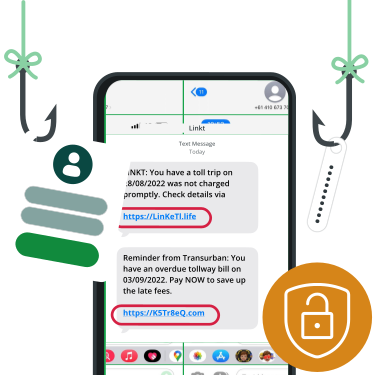
Keep an eye out for scams. We'll never ask for your personal or financial information over email or SMS. If you receive a suspicious message claiming to be from Linkt, don't click any links, report it to us so we can help prevent future scams.
Find out more about scams and how to keep your account safe.
Think you’ve received a scam?
Follow these 3 simple steps

If you have received a suspicious communication claiming to be Linkt, check your Linkt account.
If it seems suspicious, before you delete, report it to help us prevent future scams.

Once you’ve taken a screenshot, delete the message.
You can also report a scam message to the Federal Government’s ScamWatch website at scamwatch.gov.au, where you’ll find information about other scams reported across Australia.
Interpreter service
13 14 50
24 hours, 7 days a week
TTY Service
If you're deaf, have a hearing or speech impediment, please use the National Relay Service.