
Understanding toll roads in QLD

If you are planning to drive on a toll road and want to understand how toll roads work in Queensland, or have received unpaid toll communications by email, SMS, or a letter in the mail, this page will help.

How toll roads work in QLD 

Queensland’s toll roads give you a convenient and safe way to drive across the greater Brisbane and Toowoomba areas. You have to pay to use them. 

For your convenience, you don’t stop to pay on Australian toll roads. There are no booths or barriers, and cash is not used - payment is electronic.

When you drive on a toll road:

  • a picture of your vehicle licence plate is taken at toll point.
  • The toll is then charged to your toll account or pass.
  • If you don’t have a toll account, the registered owner of the vehicle may receive unpaid toll communications by email, SMS, or a letter in the mail.
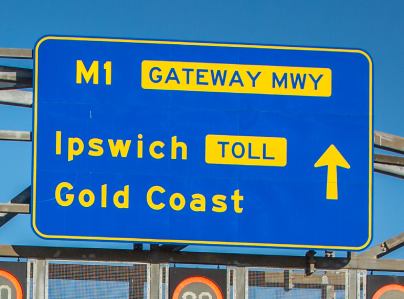
     

Example of a toll road sign in Queensland
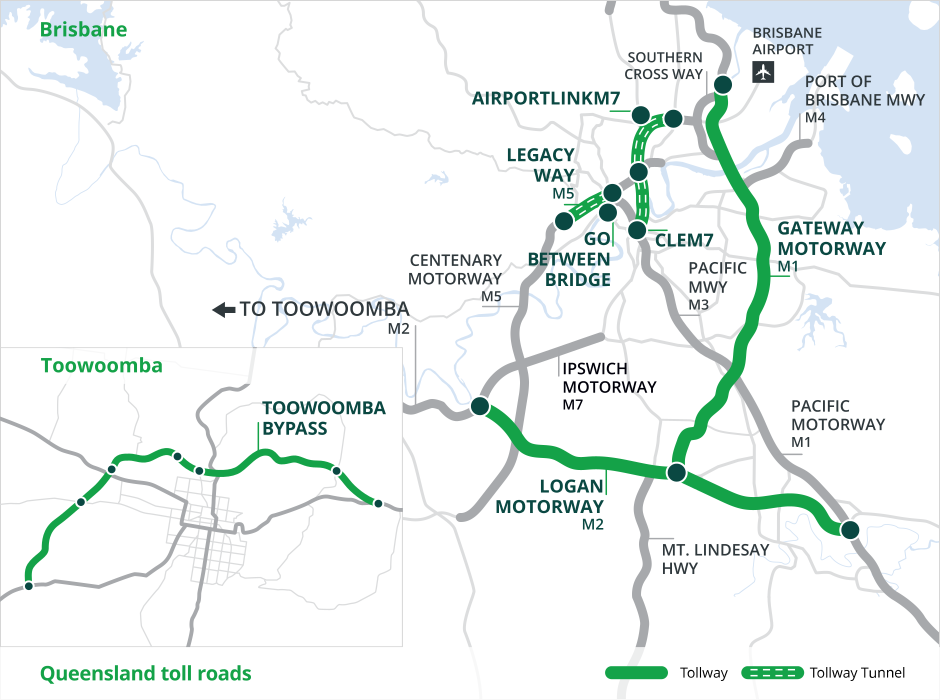
Example of a toll road sign in Queensland

You can check your route options using the trip compare tool before you drive.

How to pay for driving on a toll road

  • Option 1: Open a Linkt account

    You can pay for trips automatically every time you drive with a valid Linkt toll account. To do this, you'll need to: 

    • Set up an account or pass for your vehicle
    • Make sure your vehicle's licence plate is entered correctly
    • Select auto payments as your payment option with a valid payment card linked or manage payments manually instead (you will need to remember to top up your account to make sure it has enough funds).

    What is a tag?

    You may choose to order a tag with your account. A tag is an electronic device linked to your account that you attach to your vehicle. The tag is detected on toll roads as you drive through them, automatically charging your toll trips to your account. The tag also beeps as you pass through a toll point, so you know it has been detected.

    Choose your account

  • Option 2: Buy a pass

    A pass is a good option if you only use toll roads sometimes. It lasts for up to 30 days. A picture of your vehicle licence plate is taken at toll point and a small fee (usually $0.55 per trip) is added to match your vehicle to your trip.

    Buying a pass is easy. Just have these details on hand: 

    • Contact details
    • Vehicle make, model and licence plate number
    • Credit card details

    Buy a pass

  • Option 3: Pay after you drive

    If you already drove on a toll road without an account or pass, it’s important to fix it as soon as possible to avoid extra fees and fines. To do this, you can:

Why open a Linkt toll account?

You probably already have accounts for things you use every day like your phone, internet or electricity. A Linkt account works the same way, but for your toll road trips.

Once it's set up with auto payments selected and your vehicle's licence plate entered correctly, your tolls are paid automatically every time you drive that vehicle.

With a Linkt toll account you can:

  • See all your trips in one place
  • Manage payments easily online or through the Linkt app
  • Access Linkt Rewards for fuel savings and more

 

What happens if a toll isn’t paid? 

If you travel on a toll road without a valid toll account or pass, you'll receive a toll invoice in the mail with additional admin fees. 

It is important to pay for toll road travel as soon as possible to avoid paying more.  If you still don’t pay, enforcement action may begin and can include civil debt recovery, a Penalty Notice (fine) or legal action. 

Search for unpaid tolls

Frequently asked questions

  • I already have a Linkt account. Does it work in other states?

    Yes. A Linkt account covers trips across Australia. Your account automatically records trips in any state. If you have an account with another Australian toll provider (E-Toll or EastLink), you are also covered for trips on all Australian toll roads.

  • I received a toll notice, but I was not the driver. What do I do?

    The registered owner of the vehicle is responsible for unpaid tolls, even if someone else was driving at the time. In some states, the vehicle owner may be able to nominate another person as the responsible driver. If you are nominated, you can expect to receive a toll notice in the mail. If you believe your vehicle was not used for this trip, or you were not the owner of the vehicle at the time, contact Linkt on 13 33 31 to raise the issue. If you need language support, call TIS National on 131 450.

  • I think the toll notice is wrong. Can I dispute it?

    Yes. Contact Linkt on 13 33 31 or visit our help centre for more information. It’s always best to act before the deadline shown on your notice. If you need language support, call TIS National on 131 450.

  • Is this notice real? How can I tell?

    Linkt scams are common. If you receive an unexpected email or SMS about unpaid tolls, do not click any links. A genuine Linkt notice will:

    • include your vehicle's licence plate number and a reference number 
    • direct you to call 13 33 31 or to visit the Linkt website directly If something feels off, log in to your account, or call 13 33 31 to check.

    You can also visit our latest scams page to see known scams.

  • How do I know if a Linkt text message or email is a scam?

    Stay safe from scams 

    • Linkt may contact you about account issues, unpaid tolls, traffic updates, marketing offers you've subscribed to, or payment reminders. 
    • If you are unsure about an email or an SMS from Linkt, don't click any links. 
    • Instead, log in directly to the Linkt App or website to check your account, balance or payments. 
    • We will never ask you to click a link in an SMS to confirm personal or financial details. 
    • You can report scams on our website 

If you need financial support, help is available.

Linkt Assist 

Linkt Assist
If you are having financial trouble paying your tolls, our team at Linkt Assist is here to help. We can work with you on a payment plan that suits your situation. It’s best to get in touch early so we can find the right option for you.

You can plan your trips before you drive using Linkt's Toll Calculator and Trip Compare to compare tolled and non-tolled routes. Navigation apps like Waze and Google Maps also show toll prices alongside estimated drive times, so you can choose the route that works best for you and avoid toll roads if needed.

1300 767 865


Need help in your language?

Need help in your language?
You can speak with an interpreter to help you understand more about tolling, any communications you may have received or to open an account over the phone.

13 14 50


Your privacy matters

Your personal information is handled with care.

We collect and use your personal information to manage your toll account, process payments and provide support when you need it. All information is handled in compliance with Australian privacy laws. Our Hardship Policy explains how we identify and assist people who are experiencing hardship. Our Privacy Policy explains how we collect, use and disclose personal information (including sensitive personal information).